Introducing SCODA and SCODiA
Automated single-cell analysis, conversational data exploration, and biological interpretation in one connected workflow.
01 / Analysis to discovery
From single-cell analysis to biological discovery
SCODA is a web-based, fully automated, all-in-one analysis pipeline for single-cell RNA-seq data. It produces standardized functional-analysis results, and SCODiA provides a conversational interface for investigating those results, creating reports, reviewing references, and planning further validation.
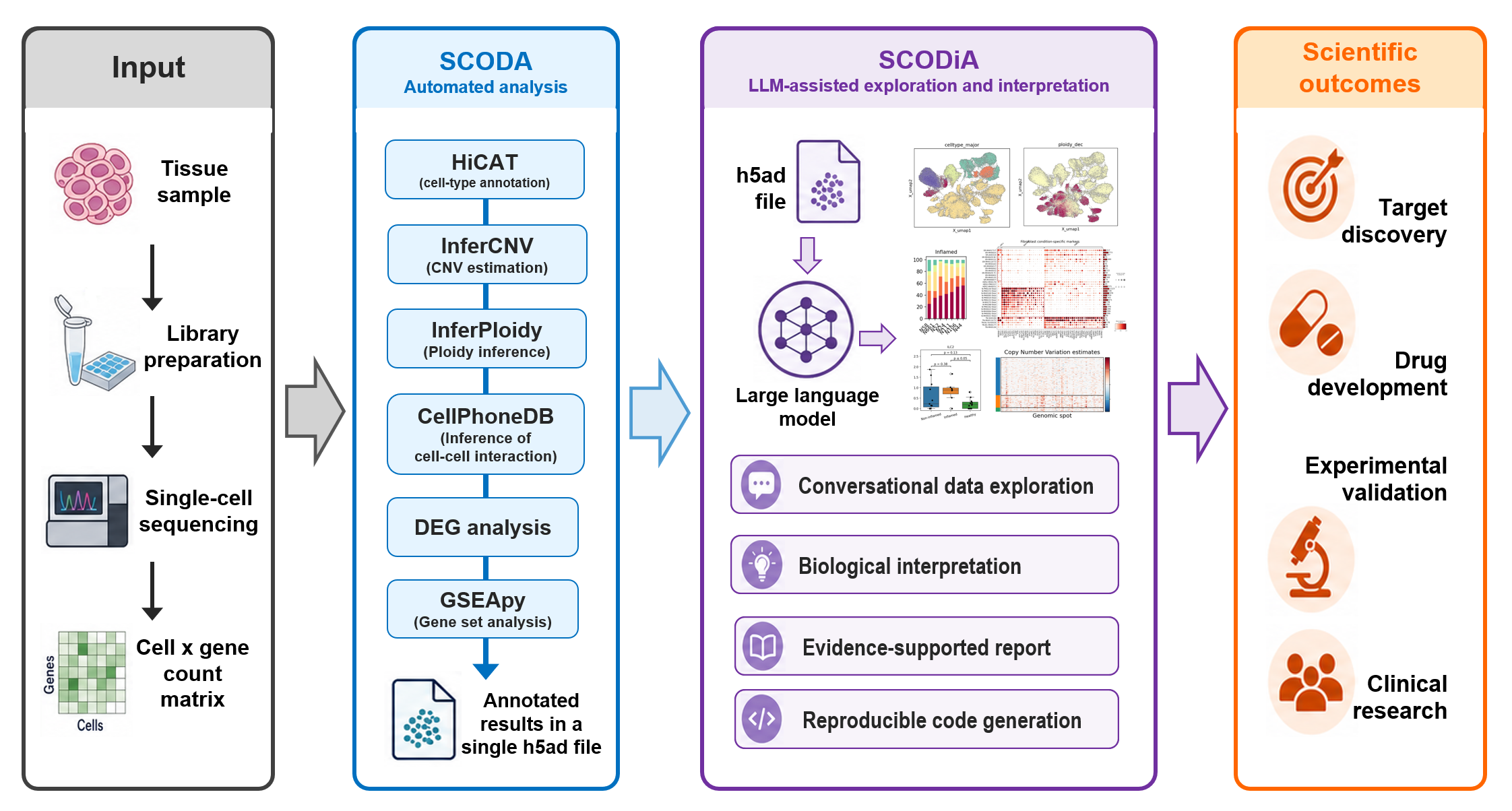
SCODA analysis results and tools
Upload your single-cell RNA-seq datasets in a compressed file to obtain annotated results in an h5ad file. The results include:
- Cell-type annotation in 3-level taxonomy, i.e., major-type, minor-type and subset, using HiCAT (MIT license)
- CNV estimates and tumor cell annotation using InferCNVpy (BSD 3-clause) and InferPloidy (MIT license)
- cell-cell interaction analysis per-condition and per cell-type using CellPhoneDB (MIT license)
- Differentially expressed gene (DEG) analysis results per-condition/cell-type.
- Gene set analysis (GSA) results per-condition/cell-type using GSEApy (BSD 3-clause)
- An automatically generated SCODiA report included in the downloaded results archive.
02 / Conversational exploration
An LLM-powered data-mining assistant for single-cell RNA-seq data
SCODiA enables researchers to explore and interpret SCODA-processed single-cell RNA-seq results through natural-language conversations.
While SCODA automates computational analysis, SCODiA helps automate data mining and biological interpretation—so researchers can focus on biological discovery and experimental validation.
Conversational data exploration
Explore single-cell analysis results using natural-language queries and perform iterative, hypothesis-driven exploration through conversation.
Biological interpretation
Interactively interpret figures and tables in biological context and turn complex bioinformatics outputs into biologically interpretable insights.
Automated reports
Generate reports automatically from saved analysis results. SCODA results include an automatically generated report for a quick overview of the analysis.
Reproducible code
Generate code snippets for figure reproduction and fine-tuning, while accessing single-cell data mining without coding.
SCODiA is designed especially for life and medical science researchers who want to investigate their data directly without becoming bioinformatics programmers.
03 / Getting started
How to use SCODiA
Prepare and upload your data
Upload Cell Ranger-processed count matrices and metadata to SCODA. See the input formatting guide for supported formats.
Run SCODA analysis
Run the automated analysis and download the results archive containing the annotated h5ad file and the automatically generated SCODiA report.
Open your results in SCODiA
Select Explore with SCODiA on the SCODA results screen, or enter an existing session ID or SCODA result file name and select Initialize in SCODiA.
Ask questions and explore
Explore the analysis results through natural-language queries. Review plots and their explanations, then ask follow-up questions to investigate your biological hypotheses.
04 / Analysis settings
SCODA configuration
Provide a cell-by-gene count matrix as the mandatory input. Optional reference files and an analysis configuration file let you tailor the workflow to your data and research question. If no optional files are supplied, the default settings are used.
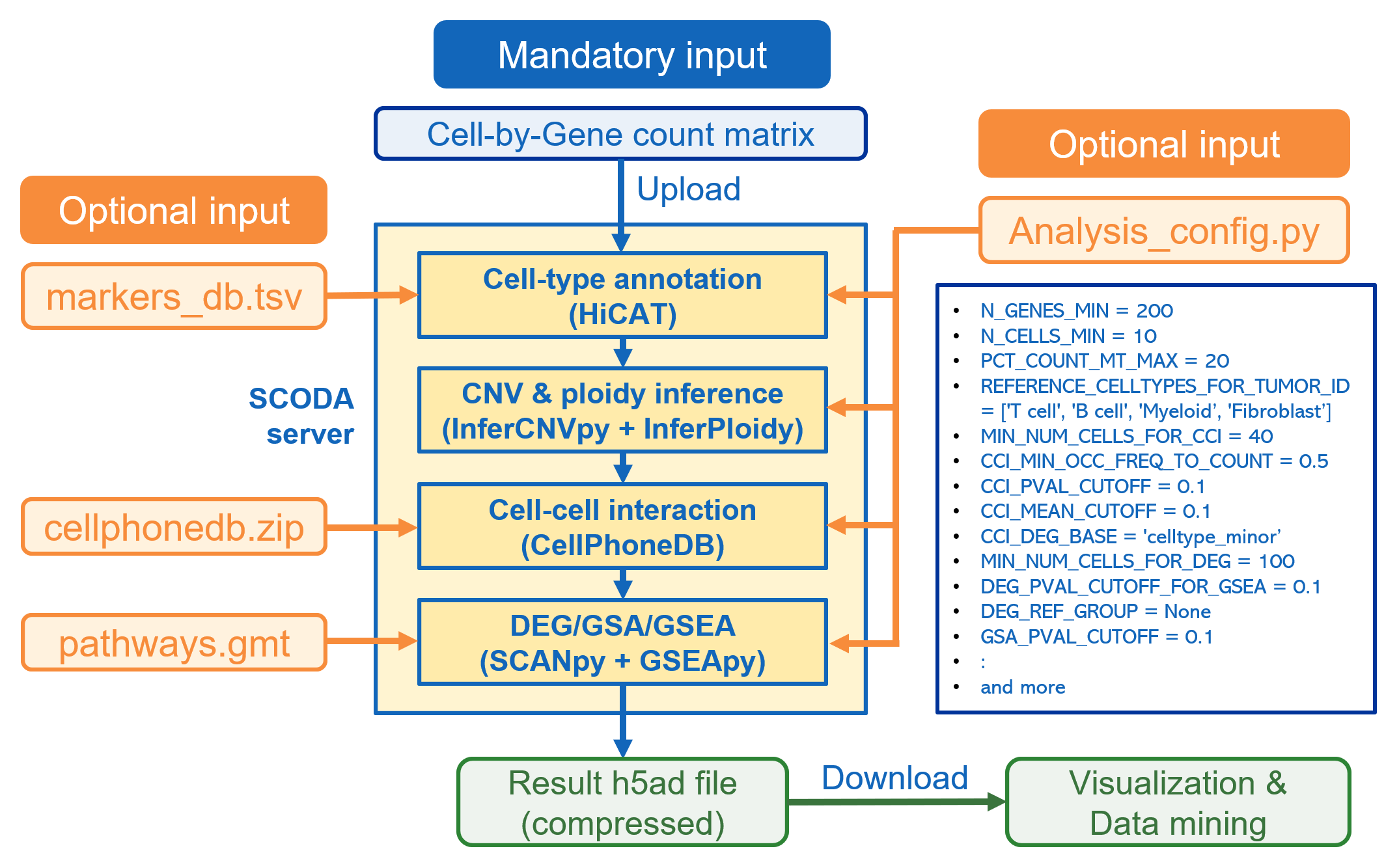
- Mandatory input
- Cell-by-gene count matrix and associated metadata, prepared according to the input formatting guide.
- Optional reference files
markers_db.tsvfor cell-type annotation,cellphonedb.zipfor cell-cell interaction analysis, andpathways.gmtfor gene set analysis.- Optional analysis configuration
- Upload a Python configuration file to customize quality-control thresholds, reference cell types, cell-cell interaction settings, and DEG or gene set analysis parameters.